Text Cleaner Tool – Clean, Format, and Organize Your Text Instantly
In the world of digital communication, presentation matters. Whether you’re writing a blog post, creating social media content, or preparing text for a message, having clean and properly formatted text is essential. Often, when you copy or paste text from different sources, it contains extra spaces, blank lines, or inconsistent formatting that can make it look messy. That’s where the Text Cleaner Tool comes in — a fast, online, and free utility designed to clean up and organize your text with just one click.
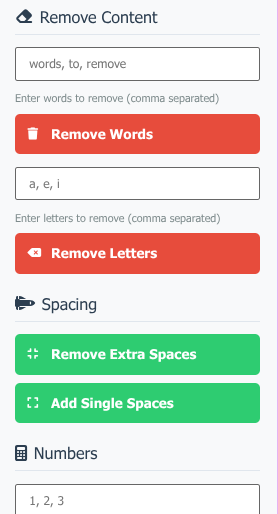
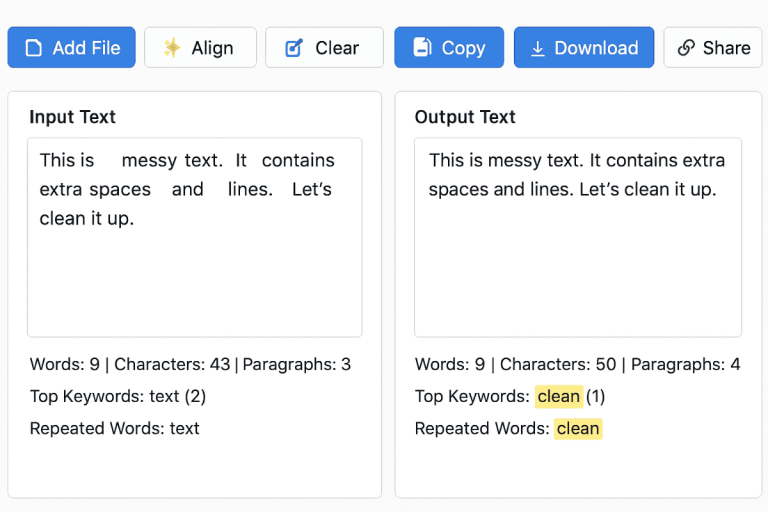
This smart online Text Cleaner Tool helps users remove extra spaces, delete blank lines, align paragraphs, and count words and paragraphs quickly. You can paste your messy text or paragraph into the tool, and within seconds, it will transform it into a neat and professional format. Whether you want to post it on WhatsApp, Facebook, blogs, or documents, this tool makes text formatting effortless.
What Is a Text Cleaner Tool?
A Text Cleaner Tool is an online utility that automatically formats and cleans your text. It identifies unwanted spaces, tabs, or line breaks and removes them while keeping the content intact. It’s perfect for cleaning up copied text from websites, PDFs, or Word documents that often come with irregular spacing and inconsistent alignment.
The best part is that it works directly in your browser, requires no installation, and is completely free to use. Just paste your text, click clean, and you’ll get a perfectly aligned paragraph ready for posting or sharing anywhere.
Key Features of the Text Cleaner Tool
Let’s explore the amazing features that make this Text Cleaner Tool an essential utility for anyone who works with text regularly:
1. Remove Extra Spaces and Lines
Sometimes when you copy text, it comes with too many spaces or line breaks that make it hard to read. This tool helps you remove all unnecessary spaces and blank lines, making your paragraph look organized and neat.
2. Clean and Align Paragraphs
The Text Cleaner Tool automatically aligns your text in a proper format. It eliminates inconsistent line breaks and ensures that your text appears as a single, well-structured paragraph.
3. Count Words and Paragraphs
Along with cleaning your text, the tool also provides a word counter and paragraph counter, which is useful for writers, students, and social media users. You can easily track the length of your content before posting or submitting it.
4. Simple Copy-Paste Function
You can add or paste messy text directly into the box, and after cleaning, just copy the polished version back. It’s as easy as copy → clean → paste.
5. Free and Online
No software download or login is required. The Text Cleaner Tool is completely free to use online from any device — whether you’re on desktop, mobile, or tablet.
6. Share Clean Text Anywhere
Once your text is formatted, you can share it directly on WhatsApp, Facebook, Instagram, blogs, or emails. Clean and professional text helps improve readability and engagement on all platforms.
Why Use a Text Cleaner Tool?
Using a Text Cleaner Tool is more than just about looks — it’s about saving time and maintaining quality. Here are some key reasons why you should start using this tool today:
Instant Cleanup: Removes unwanted spaces and lines in seconds.
Professional Formatting: Ensures your text looks clean, tidy, and easy to read.
Time Saver: Avoid manual corrections and formatting — the tool does it all automatically.
Accurate Word Count: Helps writers and editors meet specific word or paragraph limits.
No Technical Skills Needed: Just paste your text and click to clean — it’s that simple.
Works Everywhere: Whether you’re editing content for social media, school projects, or emails, this tool is universally useful.
How to Use the Text Cleaner Tool
Using the Text Cleaner Tool is incredibly simple and user-friendly. Follow these easy steps to clean and format your text online:
Paste Your Text: Copy the messy or unformatted text and paste it into the tool’s text box.
Click “Clean Text”: With a single click, the tool will remove all extra spaces and blank lines.
View Results Instantly: You’ll see a perfectly formatted, well-aligned paragraph in seconds.
Check Word Count: The tool displays the total words and paragraphs automatically.
Copy and Use: Copy the cleaned text and paste it into WhatsApp, Facebook, emails, or your document.
That’s it! You’ve just cleaned and formatted your text without any hassle.
Who Can Use the Text Cleaner Tool?
The Text Cleaner Tool is designed for everyone — whether you’re a student, writer, social media user, or professional. Here’s how different users benefit:
Writers and Bloggers: Clean and format copied content before posting it online.
Students: Prepare essays and assignments with proper alignment and formatting.
Social Media Users: Paste clean, professional-looking text on WhatsApp, Facebook, or Instagram.
Editors and Proofreaders: Quickly organize messy content for review.
Developers and Coders: Remove unnecessary spaces or line breaks from code snippets or documentation.
Benefits of Using the Text Cleaner Tool
Saves Time: Get instant results with one click.
Improves Readability: Clean text is easier to read and looks more professional.
Increases Engagement: Well-formatted posts attract more attention on social media.
Universal Compatibility: Works with all browsers and devices.
Free Forever: No hidden charges or subscription plans — 100% free online tool.
Conclusion
The Text Cleaner Tool is your ultimate online companion for formatting and cleaning up messy text. Whether you need to remove extra spaces, delete blank lines, align paragraphs, or count words and paragraphs — this tool does it all in seconds. Its free, fast, and user-friendly interface makes it a must-have for writers, students, and social media users alike.
Say goodbye to cluttered text and messy paragraphs. With the Text Cleaner Tool, you can ensure your content looks clean, professional, and perfectly formatted — ready to share anywhere, from WhatsApp messages to Facebook posts or website blogs.
Try the Text Cleaner Tool today and experience the power of clean, organized text with just one click!